
 Want to make money online without spending a dime upfront? You’re not alone. According to Statista, over 2.6 billion people are expected to engage in some form of digital freelancing or online income generation by 2025. The best part? Many methods don’t require any investment, just your time, skill and consistency.
In this guide, I’ll walk you through 15 legit ways to earn money online without investment, even if you’re a complete beginner. Whether you’re a student, stay-at-home parent or just someone looking to earn some extra cash, there’s something in here for you. Let’s dive in!
Freelancing Platforms for Beginners
 Alright, let’s talk about freelancing platforms for beginners, because wow I wish someone had sat me down and explained this stuff when I was just starting out. I remember googling “how to make money online” at like 2 a.m. while sipping cold coffee and thinking, There’s gotta be something better than retail. But it’s not exactly as easy as signing up and waiting for the money to roll in.
My first stop? Upwork. I created a profile that basically read like a college resume buzzwords, zero real-world proof and a profile picture that looked like I was applying to be an accountant. I didn’t get a single bite for a month. Not one. Then I realized people don’t hire robots, they hire humans. I rewrote my bio like I was talking to a friend. I added 2 samples (yes, even if they’re unpaid, you need ‘em) and took a couple of their free skills tests. Within a week, I landed a $50 blog post. It wasn’t much, but man, that first PayPal notification felt like I won the lottery.
Fiverr was my second experiment. I thought it was all $5 logos and TikTok jingles. But actually? It’s a goldmine if you know how to position your gigs. Instead of “I will write an article,” I tried “I’ll write a fun, SEO-friendly blog post that sounds human.” It worked. I got my first client within 4 days. Trick here? Use keywords in your gig titles and don’t rely on the default gig images. I made a Canva graphic that looked halfway decent and added a video where I awkwardly said hi and explained my process. Cringe? Yes. Effective? Also yes.
I also tried PeoplePerHour and Toptal, but those are a bit tougher if you don’t have a solid portfolio. PeoplePerHour has a weird credits system, and Toptal’s screening is like applying for NASA. If you’re just getting started, stick with platforms that let you get your foot in the door with small wins.
And real quick don’t sleep on Facebook groups and LinkedIn. I posted in a writing group once, just sharing a tip about SEO titles, and someone DMed me asking if I took freelance work. That turned into a $300/month retainer gig. Crazy, right?
Here’s what I wish someone told me:
- Start on just one platform. Don’t scatter yourself everywhere.
- Add proof to your profile even if it’s mock work you did for practice.
- Use keywords clients search for like “SEO blog writer,” “email copy,” or “Canva social media posts.”
- Be human in your messages. No one likes a canned pitch.
- Expect rejection. You might send 20 proposals before one says yes. That’s normal.
Freelancing platforms are kinda like dating apps. Lots of profiles, some ghosting, occasional weirdos but if you’re honest, consistent and you know what you offer? You’ll find your people. It just takes time. Don’t give up after the first dry week. It gets better.
Make Money on YouTube Without Showing Face
 Alright, so let’s dive into the nitty-gritty of how you can make money on YouTube without showing your face and yes, it’s 100% possible. Been there, done that and trust me, I’m not exactly the “turn on the camera and smile” type either. I started my faceless YouTube hustle after watching a video titled “You don’t need a camera to make money online.” At first, I laughed. Then I got curious. Then I made $122 in affiliate sales from one video about Google Docs. Wild, right?
Here’s what most people don’t tell you, you don’t need to go viral to make money on YouTube. You just need useful, searchable content and a consistent posting schedule. My first faceless video? A screen-recorded tutorial on how to remove a background in Canva. Boring? Maybe. Helpful? It got 3,000 views in the first month and led to a few affiliate clicks.
There are a TON of YouTube niches that don’t require your face:
- Tutorials and screen recordings (great for techy folks or educators)
- Top 10 / list videos (I used to make ones like “Top 5 free productivity tools” using B-roll and voiceover)
- Faceless commentary (you talk over stock footage or gameplay super popular in news or niche gossip)
- Meditation / nature sounds (low effort, high CPM)
- Animated storytelling (either whiteboard style or tools like Vyond, though those can get pricey)
Let’s talk about tools. You’ll want:
- OBS Studio (for screen recording it’s free)
- Audacity (for cleaning up audio if you record your voice)
- Pexels or Pixabay (for stock footage if you don’t want to film)
- Canva (for free thumbnail design)
- Script writing tool or just good old Google Docs
I started off using my phone’s mic. It sounded meh. Eventually, I bought the Blue Snowball mic for $49, and the quality jump was noticeable. But don’t let tech stop you crappy gear didn’t stop me from making my first $100.
Now, about making actual money:
- AdSense – Once you hit 1,000 subs and 4,000 watch hours, you can join the YouTube Partner Program. But it’s slow at first.
- Affiliate Marketing – This is where I made my first dollars. Do a tutorial, drop your affiliate link in the description. Boom.
- Digital Products – Sell templates, Notion dashboards, eBooks. I once made a “content planner” and linked it under a video. Got 8 sales from 200 views.
- Sponsorships – Even small channels get approached for micro-influencer deals, especially in niches like finance or tech.
- YouTube Shorts Bonuses – If you’re doing Shorts, you might qualify for their fund (though it’s competitive and kind of random).
One thing I learned the hard way: don’t use text-to-speech voices unless it’s super high-quality. I used a robotic one early on and my average watch time dropped to 30 seconds. People can smell laziness.
Start a Blog for Free and Monetize It
 Starting a blog for free? Been there, done that, crashed the site once, and still came out the other side. When I first dipped my toes into blogging, I was broke like “eating ramen three times a day” broke. I didn’t have money for fancy themes or self-hosting, but I did have time, stubbornness and Google. That was enough.
I started with Blogger (it still exists) and then jumped to WordPress.com. Not to be confused with WordPress.org, by the way that one needs hosting. With WordPress.com, you can literally set up a blog in under 20 minutes. Choose a template, write your first post, and boom, you’re a blogger. I picked a free theme called “Twenty Seventeen” and wrote about productivity tips. Not because I was a guru I just needed to pretend I had my life together.
Now here’s the truth, the free version limits you. You can’t install plugins or use custom themes, and monetizing is a bit trickier. But you can still earn money. I did it in two main ways:
- Affiliate marketing – I signed up for programs like Amazon Associates and ShareASale. I’d write “Top 5 tools to stay focused” and sneak in links to notebooks, noise-canceling headphones, and digital planners. My first commission was $3.72. Tiny, but that’s when it clicked: this can actually work.
- Sponsored posts – Once I had about 20 articles live and a decent layout, I started emailing small businesses. Not big brands think Etsy shops and local productivity coaches. A few paid me $25 to write a blog post featuring their service. Was it a lot? Nope. But I was learning how to pitch and create value.
Here’s what I wish I knew sooner:
- Pick a niche. I tried to write about everything: travel, tech, mental health and Google didn’t know what my blog was about. Once I focused on productivity and remote work, my traffic picked up.
- Use keywords even on free blogs. I’d search phrases like “best free blog tools” or “how to focus while working from home” and write content around that. These long-tail keywords got me noticed faster.
- Make your About page sound human. I used to write like a robot “Welcome to my blog, I am passionate about value creation.” No. Just be real. “Hey, I’m trying to figure out how to be productive without losing my mind. You too? Cool, let’s do this.”
Eventually, I moved to paid hosting (Namecheap + WordPress.org, around $25/year). But I’m glad I started free. It let me test the waters without pressure. If you’ve got ideas and time, there’s no excuse not to start.
Sell Photos and Art Online Without Investment
 If you’re like me and you’ve ever taken a photo of a random coffee cup and thought, Dang, that actually looks kinda artsy good news. You can sell photos and digital art online without spending a single cent upfront. No fancy DSLR, no paid tools and definitely no Etsy shop fees (at least not at first). I learned this the messy way, after uploading my designs to the wrong places, getting zero sales, and almost quitting but I stuck with it, and eventually, the passive income trickled in.
Let me start with stock photography platforms. The first one I tried was Pexels. Beautiful site, great exposure but you don’t earn money there. I quickly realized I needed platforms that actually pay. So I moved to:
- Adobe Stock
- Shutterstock
- EyeEm
These platforms let you upload photos for free and earn royalties when someone downloads them. I uploaded 10 basic shots from my phone, coffee cups, office desk setups, and even one of my cats sleeping on my keyboard (classic). Two months later, boom $0.33. Okay, not life-changing, but it felt good. Over time, those tiny amounts added up, and with more uploads came more visibility.
Now, for digital artists or illustrators, the game is a little different. I started uploading my minimalist quote posters to Redbubble and Zazzle. Both are free to join. You just upload your art and they handle printing, shipping and customer service. I made my first sale on Redbubble with a “Do Not Disturb, I’m Introverting” design. Someone bought it on a sticker. I made $1.21. I screamed. It was proof this stuff works.
Tips I’ve learned the hard way:
- Use high-resolution images, even from your phone. Lighting matters more than camera quality.
- Add super specific tags. Don’t just say “nature.” Say “sunset over pine trees in autumn.” Platforms use these to help buyers find your work.
- Upload regularly. The more stuff you have, the more chances you have to be discovered.
- Use free editing tools like Snapseed, Canva, or Photopea to polish your uploads.
- Join creative challenges on these platforms to get more eyes on your work. Seriously, it works.
Another sneaky way to get traffic? Post your art on Pinterest. You can link pins directly to your Redbubble or stock photo page. I made one pin that blew up with 10K views in a week, and sales followed. And yes it was a picture of a cat. The coolest part? No up-front costs. Zero. Nada. If you already have art sitting on your phone, tablet, or sketchbook, you can literally start uploading today. No website needed, no ads, no investment. Just your creativity and some persistence.
Transcription and Data Entry Jobs
 So let’s talk about transcription and data entry jobs, because if you’re like I was stuck at home with a laptop, some decent typing speed, and no idea how to start making money online this might be your thing. I stumbled into transcription by accident, actually. I was looking for “typing jobs from home” and landed on a forum thread where someone mentioned Rev. I signed up that same night, failed their test, tried again two days later and got in.
Transcription is pretty simple on the surface: you listen to audio, type what you hear. But oooh boy, accents, background noise, and people talking over each other? Yeah, it’s not as easy as it sounds. My first paid gig was a 12-minute interview between two people at a café. I spent over an hour pausing, rewinding, googling phrases like “what does ‘SCOTUS’ mean,” and formatting timestamps. I made $5.87. Not great, but it felt like a win.
The good thing is, there are legit sites that pay:
- Rev.com – beginner-friendly but competitive. Pays around $0.30–$1.10 per audio minute.
- TranscribeMe – short files, easier content. Pays around $15–$22 per audio hour.
- GoTranscript – accepts beginners, pays via PayPal weekly.
- Scribie – low pay, but super easy to get started.
For data entry? That path was a little slower. I signed up for Clickworker and Microworkers, where tasks ranged from copying text from a scanned image to verifying Google Maps listings. It’s repetitive, but chill. I could throw on music or a podcast and just get into a flow. Some jobs paid cents, others a few bucks but the work added up, especially when I stuck to it for an hour a day.
What I learned real quick:
- Good typing speed helps but accuracy matters more. Messy work gets rejected.
- Headphones are a must for transcription. I used $20 earbuds at first and missed so many words. Eventually upgraded to Sony over-ears and the difference was insane.
- Learn keyboard shortcuts (like CTRL+Z to undo or F4 to rewind in transcription tools). Saves so much time.
- Don’t fake experience in your applications. Start small, build a reputation, and the better gigs will follow.
Pro tip: set up Grammarly or even use Google Docs voice typing (for reviewing unclear audio). And for transcription, most platforms give feedback. Take it seriously it helped me go from rookie to regular. Also be patient. There are dry days. Some weeks I made $10, others I hit $80. It’s not flashy money, but if you’re consistent and treat it like a job, it’s dependable side income and for me, it was a stepping stone to bigger freelance gigs.
Bottom line? If you’ve got decent English skills, attention to detail, and can handle a little tedium, transcription and data entry jobs are a legit way to earn online without spending a dime upfront. You just need to show up, focus, and type like your internet bill depends on it (because let’s be real it probably does).
Start Affiliate Marketing with Zero Investment
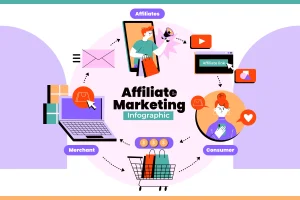 Ah yes, affiliate marketing that beautiful phrase I kept hearing in YouTube rabbit holes and blog comments until one day I finally said, Okay fine, I’ll give it a try. I had no website, no money, and honestly no clue what “commission-based sales” even meant at the time. But I was curious and a little desperate for extra income. Spoiler alert: you can start affiliate marketing with zero investment, and yep, I’ve done it.
I started by signing up for Amazon Associates, because it’s basically the go-to beginner-friendly program. It takes like 5 minutes. I grabbed a link to a $12 water bottle I was already using, wrote a post about “my favorite work-from-home desk setup,” and posted it to Reddit (bad move, got flagged). Then I posted the same thing to a Facebook group for freelancers. Boom two clicks, one sale, and a whopping $0.41 in commission. Was I rich? Nope. But I was hooked.
Here’s what I learned fast: you don’t need a blog or website to start. You can use:
- YouTube – just add affiliate links in the description (even for faceless videos!)
- Pinterest – create pins that link directly to affiliate products or landing pages
- Medium.com – write articles reviewing or comparing products and drop your links
- Facebook groups (with permission) especially niche ones where people ask for product recs
- Instagram bio or Linktree – short form content + story highlights work really well
For me, Pinterest was the golden ticket. I made simple Canva graphics (free!) like “5 things that helped my anxiety” and linked each pin to an affiliate product. I scheduled them using Tailwind’s free plan, and over time, traffic picked up. One post about noise-canceling headphones brought in $63 in one month again, not earth-shattering, but real money from pins I made while eating cereal.
The best part? No upfront cost. Just your time, creativity, and some hustle.
A few beginner-friendly affiliate programs that don’t require approval:
- Amazon Associates
- Impact Radius
- ShareASale
- ClickBank (digital products, higher commission)
- Creative Market or Canva Pro (great for creators and freelancers)
Tips I wish I knew sooner:
- Always create value-based content. Don’t just drop a link to tell people why they need the thing.
- Use SEO-friendly titles like “Best budget planners for ADHD” or “Top 3 tools I use as a freelance writer.”
- Shorten your links with Bitly or PrettyLinks for tracking (and because raw links look ugly).
- Try product comparison posts or “how I use this” content they convert way better than generic ads.
One thing to keep in mind is that it’s slow at first. You’ll post 10 times and make $0. But then you’ll post one really helpful guide, and suddenly someone clicks, buys, and you get that sweet “commission earned” email. That moment? Chef’s kiss.
Teach or Tutor Online Without Paying a Fee
 Teaching or tutoring online without paying a dime upfront? Yep it’s not only possible, it’s actually how I got started freelancing. No degree, no fancy certifications (at the time) and definitely no money for expensive platforms. I was just decent at English grammar and pretty good at explaining things. One night I typed into Google, “how to tutor online free,” and that rabbit hole led me to real paying students within two weeks. Wild.
The first platform I used was Preply. It’s totally free to join, but here’s the catch: they take a cut of your earnings. Still, I didn’t pay anything to get started. I just created a profile, uploaded a casual intro video (literally recorded on my phone), and set my hourly rate at $10. I figured it was better to start low and get reviews. My first student was from Poland. We did 30-minute conversation practice, and even though I was super nervous, I realized, Hey, I can actually do this.
Other free-to-join platforms that worked for me or my friends:
- Cambly – No application fee, and they don’t require teaching credentials. You get paid weekly to chat with students in English.
- Superprof – Good for academic subjects or even music, art, and fitness. You can list your services for free.
- TutorOcean – Free to join, and they let you set your own rates.
- Reddit (yep, seriously) – I found gigs by posting helpful answers in forums like r/LearnEnglish or r/LanguageExchange. Some folks DM’d me asking if I tutored. That led to a few long-term clients via PayPal.
Pro tips if you’re starting from zero:
- Offer a free 15-minute trial session. It builds trust and gives you a chance to showcase your style.
- Use Google Meet or Zoom for calls. Both are free and easy to use for screen sharing or whiteboarding.
- Create basic materials in Canva or Google Docs. For example, I made a “Top 20 grammar mistakes” PDF and gave it away during sessions. Students loved it.
- If you’re not sure what to teach, focus on conversational English, basic math, or homework help that are always in demand.
Now, one thing you need to understand: these platforms are competitive. When I started on Preply, I messaged five tutors just to see how they presented themselves. I noticed the best ones had friendly bios, clear photos, and specific offerings. Like instead of saying “I help students,” say “I help middle schoolers improve their essay writing for exams.” That one small tweak got me 3 bookings in a week. And don’t get discouraged if it takes a while to land your first student. I went two weeks without a single message. But then it picked up and once I had a couple reviews, it snowballed.
Offer Digital Services Using Free Tools
 Alright, this one’s close to my heart, offering digital services using free tools is exactly how I got started freelancing when I had more ambition than cash. I didn’t have Photoshop, a marketing degree, or any fancy subscriptions. But I had Wi-Fi, YouTube tutorials and Google Drive. And that was enough to land my first few gigs and eventually build a legit income stream.
My first real digital service? Creating Instagram posts for small businesses. I used Canva Free, slapped together some simple quote graphics with nice fonts, and sent samples to local cafes and wellness coaches on Instagram. One café owner bit. She offered me $50/month for 12 posts. Not much, but I still remember grinning at my phone like a maniac when that PayPal notification hit. Proof of concept, baby.
You’d be shocked how many in-demand services you can offer with totally free tools:
- Graphic design → Canva, Photopea (free Photoshop alternative), Figma
- Social media management → Buffer (free plan), Meta Business Suite, TweetDeck
- Writing/editing → Google Docs, Grammarly Free, Hemingway App
- Video editing → CapCut, Clipchamp, DaVinci Resolve
- Website building → Card, Google Sites, Notion + Super (great for portfolio-style pages)
- SEO audits → Ubersuggest (free tier), Screaming Frog (free up to 500 URLs)
- Virtual assistance → Google Workspace, Trello, Notion
I once landed a $200 gig just by using Google Slides to build a presentation for a health coach. She thought I used PowerPoint with “premium templates” nope, just free stuff and a good eye for color.
Here’s how I recommend getting started:
- Pick 1–2 skills you already have or can learn fast. (Design, writing, research, admin, etc.)
- Use free tools to create a few samples. Seriously make fake client work if you have to. It still counts.
- Create a free portfolio on Canva, Google Drive, or Notion. Don’t overthink it, just keep it clean and clear.
- Offer your services on Upwork, Fiverr, Facebook groups, or even by cold DMing local businesses (nicely).
Bonus tip: Use free tools creatively. I once used Loom (free screen recorder) to send a personalized video proposal to a potential client. She hired me the same day. It stood out because I used a free tool in a thoughtful way and people noticed that. Don’t let “free” make you feel like you’re offering less value. What matters is the result you deliver. A good Canva graphic that converts beats a bad Photoshop one every time.
Become a Micro-Influencer in a Niche
 Let me tell you a secret: you don’t need 100,000 followers to make money as an influencer. I used to think that too, until I landed my first brand deal with just under 2,000 followers. That’s when I realized the power of being a micro-influencer aka someone with a smaller but super engaged audience. And honestly? It’s one of the most realistic, low-cost ways to start making money online.
I started posting about digital organization and productivity tools. Not super flashy, but I was nerdy about it and people noticed. One day I reviewed a free to-do list app in my Instagram story just casually and tagged the brand. A week later, they messaged me offering a $50 gift card to post about their update. That was my first “influencer” gig. I didn’t even know that was a thing for small accounts.
The key? Get hyper-specific. Micro-influencers win because they talk to niche audiences:
- Dog moms who use eco-friendly products
- Plant lovers obsessed with rare species
- Gamers who only play cozy indie games
- Remote workers testing digital tools
Whatever your niche is, lean into it. Don’t just say “lifestyle influencer.” That’s too vague. Say “homebody who loves candles, journaling, and soft jazz.” You’ll attract the right crowd.
Here’s how I got started (and you can too):
- Pick a niche you actually love because fake enthusiasm burns out fast.
- Start posting helpful, relatable content consistently. Think tips, mini-reviews, daily routines.
- Use relevant hashtags and engage with similar creators. Comment, reply, share. It’s a community game.
- Set up a clean profile with a clear bio like: “Helping fellow ADHD brains stay organized”
- Create a media kit on Canva (yes, free!) once you hit around 1K followers and some engagement.
Now, let’s talk about money. How do you actually earn as a micro-influencer?
Monetization Options:
- Brand deals (use platforms like Collabstr, JoinBrands, or even DM small brands directly)
- Affiliate marketing (link your fave products with tools like Later or Milkshake)
- UGC (User-Generated Content) – brands pay you to create content for them, not your followers
- Tips or subscriptions – think Ko-fi, Buy Me a Coffee, or IG Subscriptions if your niche is tight-knit
My second deal came from a productivity notebook brand. They paid $75 for one IG Reel and two stories. I shot it all on my phone, edited it in CapCut, and got it done in an afternoon. I’ve since done several of those “small but sweet” collabs and they add up.
Write eBooks or Guides and Publish for Free
 Let me tell you, writing eBooks and publishing them for free was the side hustle I completely underestimated. I figured you needed to be a bestselling author or some kind of grammar wizard to pull it off. Nope. All I had was Google Docs, a rough idea, and a ton of curiosity. Fast forward a few months, I’d written a short guide on productivity hacks for freelancers and uploaded it to Gumroad and people actually bought it. Like real humans. With money. That first sale was $4.99. I almost cried.
What I quickly learned is that you don’t need a publisher or even a budget, to create something useful and sell it online. In fact, most of the tools I used were completely free:
- Google Docs (for writing and formatting)
- Canva (for a simple cover design)
- Gumroad and Payhip (to host and sell the file, without fees upfront)
- Draft2Digital (to distribute to Kindle, Apple Books, and more)
My guide was only about 22 pages more like a beefed-up blog post. And that’s the trick: people don’t always want long books, they want quick wins. Think “How to Create a Weekly Budget in 30 Minutes” or “A Beginner’s Guide to Meal Prep for One.” You don’t need to write a novel. You just need to solve a small, specific problem.
Here’s how I put it together:
- I brainstormed a topic I already knew well about freelance productivity systems.
- Broke it into 5-6 sections using bullet points and simple headers (no fluff).
- Added some screenshots and examples to make it feel personal and real.
- Exported it as a PDF and uploaded to Gumroad with a “pay what you want” option (set the minimum to $0). People still paid!
What works well as eBooks or guides:
- How-to guides (especially step-by-step formats)
- Niche advice (like “Instagram Growth for Tattoo Artists”)
- Templates or planners
- Personal development checklists
- Tutorials turned into downloads (think “Beginner’s Guide to Notion”)
And yes you can market it for free too:
- Promote on Pinterest (I made 3 pins in Canva, linked to my Gumroad)
- Share excerpts on Twitter or Threads
- Post in niche Facebook groups (if allowed)
- Create one freebie chapter and use it as an email list magnet
Look, your first guide might not make $500. Mine made $48 in the first month. But that’s $48 for something I already knew, sitting in a Google Doc. Plus, it keeps earning month after month. That’s the beauty of digital products.
 Earning money online without investment is more possible in 2025 than ever before! Whether you choose freelancing, content creation, or affiliate marketing, the key is to start small, stay consistent, and build up. The beauty of the internet is that there’s room for everyone from beginners with zero dollars to seasoned professionals. So pick one method from this list, take action today, and turn your free time into real income!
Ready to start your online earning journey? Let’s make 2025 your most profitable year yet!